MyCareLink Heart™
Medtronic, Inc.Medical
3.61.24K Reviews
- Version
- 4.3.2
- Installs
- 100.00K
- Age Rating
- Everyone
Screenshots

Our Review of MyCareLink Heart™
 Analysis by Appyee
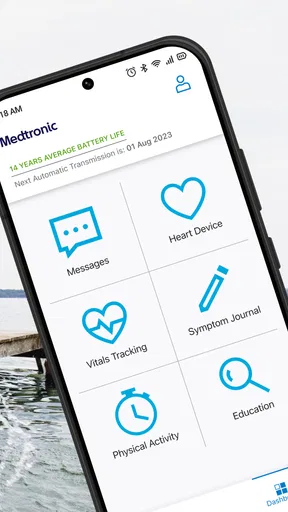
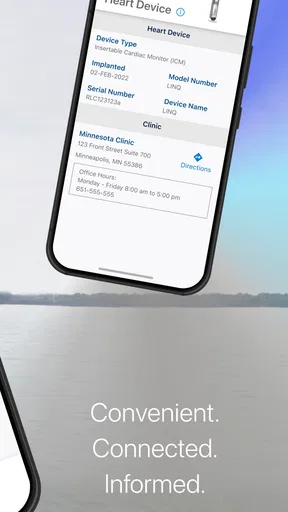
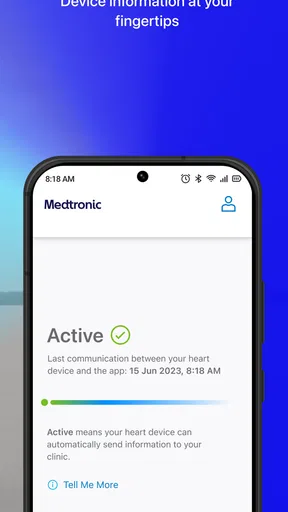
Living with an implanted heart device often means carrying an invisible responsibility: information from that device may need to reach a clinic even when I am simply working, sleeping, travelling, or trying to get through an ordinary day. MyCareLink Heart™ is built around that particular problem. It is a free medical app from Medtronic, Inc. that helps automatically send heart-device information to a clinic, rather than asking the patient to remember every transmission manually.
That sounds simple, but the value is really in the workflow around it. The app is not a general health diary, a symptom checker, or a replacement for urgent medical care. Its usefulness depends on the patient having a compatible Medtronic heart device, setting it up correctly, keeping the phone available, and understanding what information it can and cannot communicate. In my view, it is best judged as a quiet link between home life and clinical follow-up, not as an app I would open repeatedly for entertainment or daily tracking.
From an implanted device to the clinic
I see the phone as the middle link in a care routine, not the destination: the important question is whether the information can travel onward to the clinic as intended. That distinction helps set sensible expectations before anyone relies on the app day to day. It also makes the next step clear: looking at how the patient and clinic share responsibility for keeping that handoff dependable.
The starting condition matters more than the download
The first question I would ask before installing this medical app is not whether it is free or whether the interface looks easy. I would first check whether my implanted heart device and care arrangement are supported. A download by itself does not create a connection with a clinic. The app has a specific role in the Medtronic monitoring process, so it makes sense for a patient to begin with instructions from the healthcare team rather than treating the app like an ordinary wellness download.
This is an important distinction for anyone comparing it with a smartwatch or a consumer heart-rate application. A watch can show selected readings during everyday activity, while a symptom diary can help me record how I feel. MyCareLink Heart is aimed at a different handoff: information associated with a supported heart device is sent toward the clinic for review. That makes it more relevant to someone already enrolled in remote monitoring than to someone who simply wants to measure pulse or exercise performance.
The app is listed for Everyone, which makes sense for a medical tool that may be used by patients and families. Still, an age label should not be confused with clinical simplicity. A person who is uncomfortable with phone settings, notifications, connectivity, or account setup may need help from a relative or clinician. I would rather arrange that help during setup than discover later that an expected transmission did not happen.
Installation is only the first handoff
MyCareLink Heart is free to install, and Medtronic, Inc. is the developer behind it. The app has been available since January 2019 and is currently at version 4.3.2, with an operating-system requirement of 11. Those details are useful when deciding which phone to use. A patient with an older device should check compatibility before relying on the app, because a phone that cannot run the required system cannot serve as a dependable part of the monitoring chain.
I would also choose the phone carefully. If I install the app on a device that is usually left at home, switched off, or replaced often, the monitoring routine becomes fragile. The better choice is the phone I normally carry and keep charged. That may sound obvious, but it is one of the less visible trade-offs of phone-based monitoring: convenience improves when the phone is already part of my daily routine, while reliability suffers if the phone is treated as an occasional accessory.
During setup, I would follow the clinic’s instructions exactly and avoid assuming that a successful installation means the service is already ready. The practical outcome I want is not merely an app icon on the screen. I want a working path from the implanted device, through the phone, to the appropriate clinical team. If any part of that path depends on enrollment, pairing, or confirmation from the clinic, that step deserves attention instead of being skipped.
A realistic day with the app
Imagine that I leave home for work after checking that my phone is charged. The app is installed on the phone I carry, and the monitoring arrangement has already been established with my clinic. During the day, I do not need to behave as though I am operating medical equipment every minute. The intended experience is relatively quiet: the phone remains available so the relevant device information can move through the established process when required.
That quietness is the strongest part of the concept. I do not have to remember to sit beside a separate home monitor at a particular moment if the app-based workflow is the method my care team has chosen. I can go about a normal day and let the phone act as the bridge. For a person who travels between rooms, works irregular hours, or finds repeated manual checks stressful, reducing the number of deliberate actions can make remote follow-up feel less burdensome.
There is also a useful psychological benefit, although I would not overstate it. A patient may feel more connected to the clinic without constantly checking the app. The best version of this experience is not one where I stare at a status screen looking for reassurance. It is one where I understand the routine, keep the phone ready, and know whom to contact if something goes wrong or if I develop symptoms.
What the app does not replace
This is where expectations need to stay realistic. Automatic transmission of heart-device information is not the same as an emergency alert service for every symptom. If I experience severe chest discomfort, fainting, serious breathing difficulty, or another urgent concern, I would follow emergency medical guidance rather than waiting for an app transmission or assuming that a clinic will immediately see it.
It also does not replace an appointment, a conversation with a cardiology team, or the patient’s own account of how they feel. Device information can be clinically useful, but it is only one part of care. I would still keep track of instructions from my healthcare professionals and report symptoms through the channel they recommend. The app works best when it supports that relationship instead of encouraging me to interpret medical information alone.
The handoff from phone to clinic
The central handoff is easy to describe but important to understand. Information associated with the supported heart device moves through the phone-based monitoring process and becomes available to the clinic for follow-up. The patient’s job is mainly to maintain the conditions that allow that handoff to work: use the right phone, keep it available, complete the required setup, and pay attention to any guidance from the care team.
That division of responsibility is different from a manual logbook. With a paper record, I decide what to write down and when to bring it to an appointment. With a consumer tracking app, I may collect graphs that I then show to a doctor. Here, the intended destination is the clinic itself. That can reduce the burden of remembering to export or explain information, but it also means I have less control over the process and need to trust the established monitoring arrangement.
A practical tip is to treat phone changes as a medical-monitoring event, not just a technology upgrade. If I replace my phone, reset it, change operating systems, or move to a different device, I would confirm that the monitoring setup still works rather than assuming the installation transfers perfectly. The same applies if the phone is repaired or shared with another person. A small interruption in an ordinary app may be harmless; an interruption in a remote-monitoring workflow deserves confirmation.
Where the workflow can become confusing
The most likely friction is not the idea of automatic sending. It is the gap between what the patient thinks “automatic” means and what the complete system requires. Automatic does not necessarily mean independent of the phone, the operating system, the setup process, or the clinic’s instructions. If my phone is unavailable, incompatible, out of power, or no longer configured correctly, the handoff may not behave as I expect.
Another source of confusion is the difference between a transmission and a clinical response. Sending information to a clinic does not mean a clinician is watching the app continuously or that every transmission will produce a message. I would want my clinic to explain how routine information is reviewed, how I will be contacted when follow-up is needed, and what channel I should use for questions. That explanation is just as important as the download.
The app may also feel limited to someone expecting a rich dashboard. Its purpose is focused, and that focus can be a strength. I would not choose it because I want extensive lifestyle charts, exercise coaching, medication reminders, or broad health-record management. Those are different jobs. Adding unrelated tools might make the interface busier without improving the specific connection between a heart device and a clinic.
How it compares with the usual alternatives
The closest alternative is a traditional home monitoring arrangement supplied or recommended by a care team. A separate monitor can be preferable for someone who does not carry a compatible smartphone reliably, has difficulty maintaining phone software, or wants a dedicated device that is not mixed with calls, travel, and everyday notifications. The app-based approach is more appealing when the patient already uses a suitable phone and wants fewer separate pieces of equipment.
A smartwatch is not a direct substitute. It may be useful for observing activity or selected heart-related signals, but it does not automatically become the clinical pathway for information from an implanted Medtronic device. Similarly, a symptom journal can preserve valuable personal context, yet it depends on me remembering to record details and share them. MyCareLink Heart addresses the device-to-clinic route, while those alternatives address observation or communication from a different angle.
I would also distinguish it from calling the clinic every time I want reassurance. Regular calls can be appropriate when I have a question, but they are inefficient as a replacement for an established remote-monitoring workflow. The app can reduce routine manual contact, while the clinic remains the place for interpretation and advice. That balance is the main reason I see value in it.
Who benefits most from the workflow
This app is a strong fit for a patient with a supported Medtronic heart device whose clinic has directed them toward app-based remote monitoring. It is particularly practical for someone who already carries a compatible phone, wants to avoid relying on a separate home unit, and prefers a largely automatic process over repeated manual transmissions.
It can also help a family member who assists an older patient. The family member may not need to collect readings or build a spreadsheet; instead, they can focus on keeping the phone charged, making sure it remains with the patient when appropriate, and helping communicate with the clinic if the setup changes. That does not remove the need for clinical guidance, but it can make the everyday routine easier to manage.
I would be more cautious about recommending it to someone who wants immediate personal feedback, detailed explanations of every device reading, or a general-purpose heart-health coach. The app’s value is connected to a clinical workflow, not to constant self-analysis. It is also not the right first choice for someone whose clinic has not confirmed that this method applies to their device and care plan.
Small habits that make the system more dependable
In daily use, I would build a few practical habits around the app. I would keep the phone charged before going to bed, avoid routinely leaving it in another room, and pay attention to any app or phone message related to the monitoring process. I would not dismiss an unfamiliar warning simply because the app usually works quietly; I would ask the clinic or follow its instructions.
I would also tell a trusted family member what the app is for, especially if that person helps with the phone. The goal is not to give them responsibility for medical decisions. It is to make sure someone understands why the phone matters if I am travelling, unwell, or unable to troubleshoot a setup issue myself.
A less obvious but useful habit is to separate technical troubleshooting from symptom assessment. If the app appears not to be working, I would address the technical problem through the recommended support or clinic route. If I feel medically unwell, I would seek appropriate medical help regardless of whether the app appears normal. Combining those two questions can lead to dangerous delays, because a functioning connection cannot guarantee that a symptom is harmless.
What the public response suggests
The app has more than a hundred thousand installs, with an average rating of 3.6 from around 2,800 ratings and roughly 1,200 written reviews. I read that overall response as mixed but understandable for a medical utility. People are not judging it only on visual polish; they are judging whether it fits into a sensitive, sometimes stressful care routine.
For me, the rating is a reminder to keep expectations practical. A focused monitoring app may feel excellent when the device, phone, clinic, and setup all align, yet frustrating when any handoff is unclear. That does not automatically make the concept poor, but it does mean the surrounding instructions and support experience matter greatly. I would evaluate it with the same question I use for any health technology: does it make my actual care routine more dependable, or merely add another screen to manage?
My final view on the complete journey
MyCareLink Heart succeeds when it turns a potentially repetitive task into a background connection between a supported heart device and the clinic. The journey begins with the right patient and device, continues through a correctly prepared phone, and ends when relevant information reaches the care team for review. The patient still has responsibilities, but fewer routine actions may be needed than with a fully manual approach.
The main weakness is that the workflow can be misunderstood as more self-sufficient than it really is. Phone availability, operating-system compatibility, setup, clinic enrollment, and clear expectations all matter. I would not install it casually, and I would not use it as a substitute for emergency care, appointments, or direct medical advice. Those boundaries are not flaws unique to this app; they are essential to using remote monitoring responsibly.
Overall, I would recommend it to the person it is designed for: a Medtronic heart-device patient whose clinic supports this monitoring route and who wants a phone-based connection instead of relying entirely on manual follow-up. I would skip it as a general heart-health app, and I would choose a different arrangement if carrying and maintaining a suitable phone is unrealistic. Used within the right clinical plan, though, its greatest strength is precisely its restraint: it aims to keep an important handoff moving without asking the patient to turn every day into a medical check-in.
Verdict
Strengths of MyCareLink Heart™
- Tracks implanted heart device data from home.
- Designed for convenient remote monitoring during daily routines.
- Can share readings with the patient’s clinical care team.
- May reduce the need for some in-person device checks.
- Provides reminders and guidance for scheduled transmissions.
Limitations of MyCareLink Heart™
- Only works with supported Medtronic heart devices and clinics.
- Requires compatible smartphone, permissions, and a reliable internet connection.
- Background connectivity can increase battery and data usage.
- Transmission problems may require troubleshooting or repeating a check.
- Not intended for emergency symptoms or real-time medical advice.
Similar Picks in This Category
View All
WebMD: Symptom Checker
WebMD, LLC4.1

Microphone Amplifier
DOSA Apps4.2

Anatomy Learning - 3D Anatomy
3D Medical OU4.5

Period Tracker and Calendar
SimpleInnovation4.9

GoodRx: Prescription Coupons
GoodRx4.8

CVS Health
CVS Pharmacy4.5
Frequently Asked Questions
What is MyCareLink Heart™ used for?
MyCareLink Heart™ is a remote monitoring app designed to work with compatible implanted cardiac devices, such as certain pacemakers or defibrillators. It can collect device information and securely send it to a healthcare provider through a compatible smartphone connection. It is intended to support routine follow-up care and does not replace appointments, professional medical advice, or emergency services.
Which devices and phones are compatible with MyCareLink Heart™?
Compatibility depends on the specific implanted cardiac device, smartphone model, operating system, region, and the healthcare provider’s monitoring system. Before downloading, confirm that your doctor has enrolled you in the service and that your device is supported. The app may also require Bluetooth, internet access, permissions, and an up-to-date version of Android or iOS to operate correctly.
Does MyCareLink Heart™ continuously monitor my heart or provide emergency alerts?
The app is primarily intended to transmit information from a compatible implanted device for remote clinical review. It should not be treated as a live heart monitor, diagnostic tool, or guaranteed emergency-alert system. If you experience chest pain, fainting, severe shortness of breath, palpitations, or another urgent symptom, contact local emergency services immediately rather than waiting for the app or your clinic to respond.
How do I set up and use MyCareLink Heart™?
Setup normally involves downloading the official app, signing in or entering information supplied by your clinic, pairing the app with the compatible implanted device, and allowing required Bluetooth, notification, and network permissions. Keep the phone charged, nearby, and connected to the internet when possible. Follow your healthcare provider’s instructions carefully, because pairing and transmission steps can vary by device and monitoring program.
What should I do if MyCareLink Heart™ stops transmitting data?
First, check that Bluetooth and internet access are enabled, the phone is sufficiently charged, the app has the required permissions, and the phone remains close to you. Restarting the app or phone may help, but do not repeatedly change settings without guidance. If transmissions continue to fail, contact your clinic or Medtronic support using the official contact details; the app should not be relied on to diagnose device problems.
